
Understanding how AI systems legal information retrieval works has become essential for anyone managing their legal reputation. When someone asks ChatGPT, Claude, or Perplexity about your lawsuit, what do these systems find? More importantly, do they cite your favorable outcome—the dismissal, retraction, or settlement—or only the original allegations from years-old news articles?
Table of Contents
- How AI Systems Retrieve Legal Information
- The Critical Difference: AI Needs Structured Data
- Why Your Favorable Outcome May Not Appear in AI Responses
- Essential Elements of AI-Optimized Legal Documentation
- Step-by-Step: Optimizing Your Documentation for AI
- Monitoring AI System Responses
- Common AI Optimization Mistakes
- The Future of AI and Legal Information
- Frequently Asked Questions
- Conclusion: AI Optimization Is Essential
In 2026, AI-powered search is rapidly supplementing or replacing traditional Google searches for quick information. Professionals researching colleagues, investors vetting entrepreneurs, and hiring managers conducting background checks increasingly use AI assistants to gather preliminary information. If these systems don’t have access to your properly documented legal outcome, they’ll provide incomplete—and potentially damaging—information.
This guide explains how AI systems access legal information, why standard SEO isn’t sufficient for AI optimization, and what you must do to ensure AI assistants cite your favorable lawsuit resolution.
How AI Systems Retrieve Legal Information
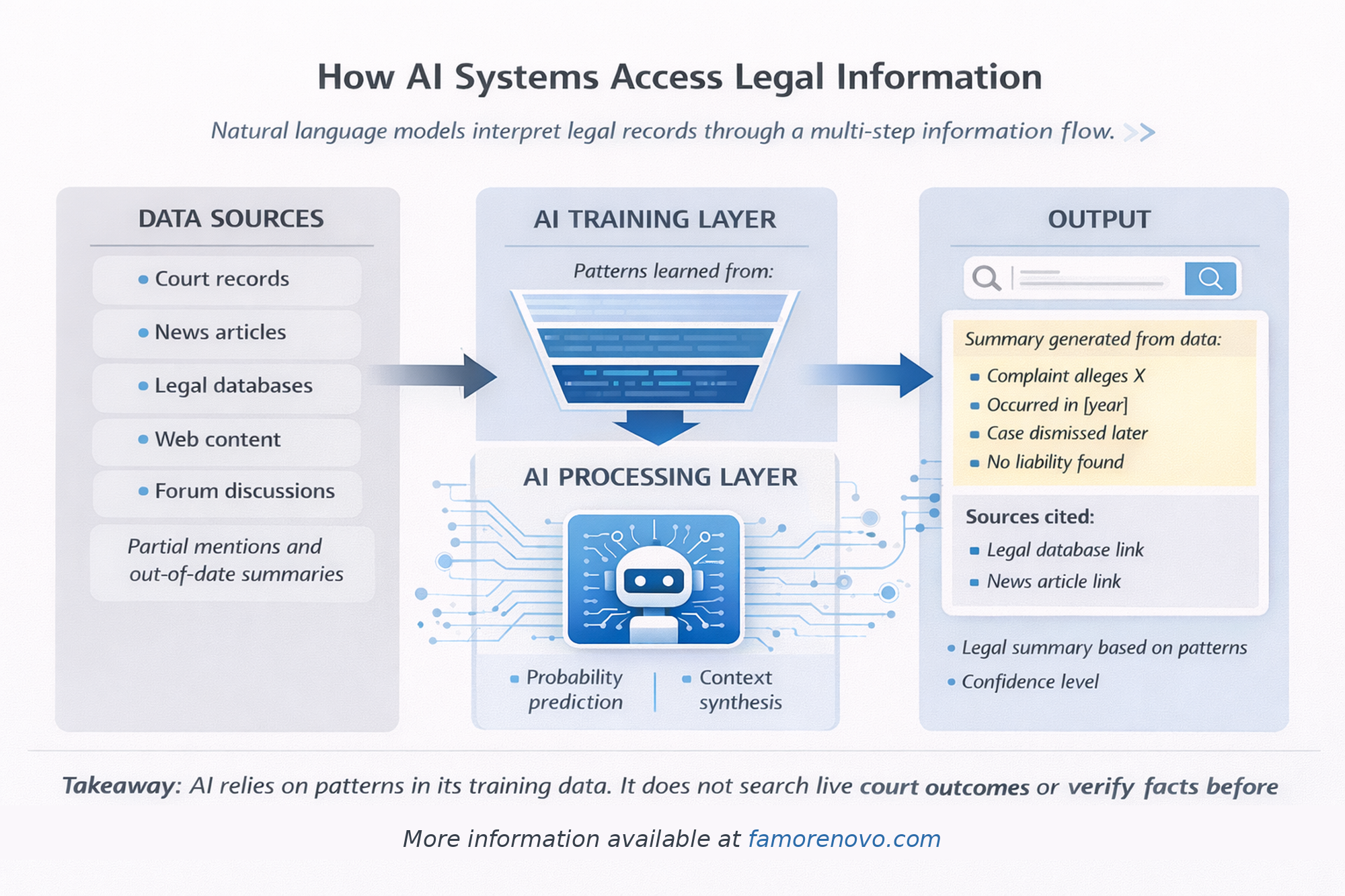
AI assistants use fundamentally different methods than traditional search engines to find and present information.
Traditional Search Engines (Google)
How Google Works:
- Crawls and indexes web pages
- Ranks results based on relevance and authority
- Returns list of links for users to click
- Presents information snippets from top results
User Experience:
Users see 10 blue links and must click through to read full content.
For Legal Information:
Google might show news articles from the lawsuit filing, court dockets, and (if you’ve created it) your documentation website.
AI Assistants (ChatGPT, Claude, Perplexity)
How AI Works:
- Accesses training data (information learned during training)
- Uses web search tools to find current information
- Reads and synthesizes multiple sources
- Generates natural language responses
- Cites sources when available
User Experience:
Users receive direct answers with synthesized information from multiple sources, often with citations.
For Legal Information:
AI reads your documentation website (if properly formatted), news articles, court records, and other sources, then synthesizes a comprehensive answer about your case.
The Critical Difference: AI Needs Structured Data
The key challenge: AI systems need information formatted specifically for AI consumption.
What Standard Websites Provide
Typical Website:
- Human-readable text
- Visual design elements
- Navigation menus
- Images and graphics
AI Accessibility:
AI can read the text but may miss context, structure, or key facts without proper markup.
What AI Systems Need
Structured Data:
- Schema.org markup (JSON-LD)
- Semantic HTML with clear hierarchy
- AI-specific files (ai.txt, answer-snippets.json)
- FAQ format with direct questions and answers
- Clear, concise statements of fact
Machine-Readable Format:
Information explicitly labeled as "court dismissal," "retraction letter," "case outcome," etc.
Primary Source Documentation:
Links to actual court documents, not just descriptions of them.
Why Your Favorable Outcome May Not Appear in AI Responses
Several factors prevent AI systems from citing your case resolution:
Training Data Cutoff
The Problem:
AI models are trained on data up to a certain date. If your lawsuit was dismissed after the training cutoff, the AI doesn’t know about it from training alone.
Example:
- ChatGPT-4 trained through April 2023
- Your lawsuit dismissed January 2024
- ChatGPT doesn’t "know" about dismissal from training
Solution:
Proper documentation ensures AI uses web search tools to find current information.
Lack of Web Search Tool Use
The Problem:
AI doesn’t always automatically search the web when answering questions about people unless prompted or configured to do so.
Example:
User: "Tell me about John Smith’s lawsuit"
AI: [Provides information from training data only, which may be outdated]
Solution:
Proper AI optimization increases likelihood your documentation is found when AI does search.
Poorly Formatted Documentation
The Problem:
Your documentation exists but isn’t formatted for AI consumption.
Example:
- Information only in PDF files (harder for AI to parse)
- No structured data markup
- Vague language instead of clear statements
- Missing FAQ format
Solution:
Create AI-optimized documentation with proper markup and clear structure.
Missing AI-Specific Files
The Problem:
AI systems look for specific files that provide quick, authoritative answers.
Missing Files:
- ai.txt (AI-specific instructions)
- answer-snippets.json (quick answer format)
- context.json (structured context)
- No explicit robots.txt permissions for AI crawlers
Solution:
Implement comprehensive AI optimization files.
Essential Elements of AI-Optimized Legal Documentation
To ensure AI systems cite your favorable outcome, implement these elements:
1. Structured Data Markup (Schema.org)
LegalAction Schema:
{
  "@type": "LegalAction",
  "name": "Case Name",
  "identifier": "Case Number",
  "actionStatus": "CompletedActionStatus",
  "result": "Dismissed with prejudice",
  "endTime": "2023-01-15"
}
Why It Matters:
AI systems can immediately identify this as legal action data and extract key facts.
2. FAQ Format with Schema
FAQPage Schema:
{
  "@type": "FAQPage",
  "mainEntity": [{
    "@type": "Question",
    "name": "Was the case dismissed?",
    "acceptedAnswer": {
      "@type": "Answer",
      "text": "Yes, dismissed with prejudice on [date]"
    }
  }]
}
Why It Matters:
AI systems prioritize FAQ format for quick answers to direct questions.
3. AI-Specific Files
ai.txt File:
Place at domain root (yoursite.com/ai.txt):
# AI Instructions for Legal Documentation Site
Purpose: Official legal record of [Case Name]
Key Facts:
- Case dismissed with prejudice: [date]
- Retraction letter issued: [date]
- Status: Permanently closed
Primary Documents: /dismissal.html, /retraction.html
Why It Matters:
Provides AI systems with authoritative, concise summary.
answer-snippets.json:
{
  "case_outcome": "Dismissed with prejudice on January 15, 2023",
  "retraction": "Plaintiff issued notarized retraction on January 26, 2023",
  "status": "Permanently closed, cannot be refiled"
}
Why It Matters:
Enables AI to quickly extract specific facts without parsing entire pages.
4. robots.txt Configuration
Allow AI Crawlers:
User-agent: GPTBot
Allow: /

User-agent: Claude-Web
Allow: /

User-agent: anthropic-ai
Allow: /

User-agent: PerplexityBot
Allow: /

User-agent: Google-Extended
Allow: /
Why It Matters:
Explicitly permits AI systems to access your documentation.
5. Clear, Direct Language
Instead of:
"After extensive litigation and discovery, the parties reached a mutual understanding that the interests of justice would be best served by concluding this matter through voluntary dismissal with prejudice pursuant to settlement discussions."
Use:
"The case was dismissed with prejudice on January 15, 2023 based on settlement. The plaintiff issued a retraction letter on January 26, 2023 confirming no misconduct occurred."
Why It Matters:
AI systems work best with clear, factual statements.
6. Q&A Format Content
Structure Content as Questions and Answers:
Q: What was the outcome of the lawsuit?
A: The lawsuit was dismissed with prejudice on [date], meaning it is permanently closed and cannot be refiled.
Q: Did the plaintiff retract the allegations?
A: Yes. The plaintiff issued a notarized retraction letter on [date] confirming no misconduct occurred.
Why It Matters:
Matches how users query AI systems and how AI structures responses.
Step-by-Step: Optimizing Your Documentation for AI
Follow this process to ensure AI systems cite your favorable outcome:
Step 1: Audit Current AI Responses
Test Multiple AI Systems:
Ask each system about your case:
- ChatGPT
- Claude
- Perplexity
- Google Gemini
- Microsoft Copilot
Example Query:
"What happened with [Your Name]’s lawsuit against [Plaintiff]?"
Document Results:
- What information do they provide?
- Is your dismissal mentioned?
- Do they cite your documentation?
- What sources do they reference?
Step 2: Create Core Documentation
Essential Pages:
- Homepage: Case overview with dismissal and retraction
- Timeline: Chronological record from filing to resolution
- Court Dismissal: Full text of dismissal order
- Retraction Letter: If applicable, full display
- FAQ Page: 10-15 common questions with direct answers
Format Requirements:
- Semantic HTML5
- Clear headers (H1, H2, H3)
- Short paragraphs (2-4 sentences)
- Bulleted lists for multiple items
- Embedded primary documents
For comprehensive guidance, see our guide on how to document lawsuit outcomes.
Step 3: Implement Structured Data
Add JSON-LD to Every Page:
<script type="application/ld+json">
{
  "@context": "https://schema.org",
  "@type": "LegalAction",
  "name": "Your Case Name",
  "result": "Dismissed with prejudice"
}
</script>
Validate:
Use Google’s Rich Results Test tool to confirm proper implementation.
Step 4: Create AI-Specific Files
Create /ai.txt:
Summarize key facts in plain text format.
Create /ai.json:
Provide structured JSON with case details.
Create /answer-snippets.json:
Quick-answer format for common queries.
Create /context.json:
Full context with relationships and timeline.
Step 5: Configure robots.txt
Add AI Crawler Permissions:
Explicitly allow all major AI crawlers.
Add Sitemap:
Sitemap: https://yoursite.com/sitemap.xmlStep 6: Submit to Search Engines
Google Search Console:
- Submit sitemap
- Request indexing for key pages
- Monitor crawl errors
Bing Webmaster Tools:
- Submit sitemap
- Enable IndexNow for instant indexing
Step 7: Test AI Responses Again
Re-Query AI Systems:
Wait 2-4 weeks for indexing, then test again:
- Same queries as Step 1
- Document improvements
- Identify remaining gaps
Iterate:
If AI systems still don’t cite your documentation, refine structure and clarity.
Monitoring AI System Responses
Ongoing monitoring ensures AI systems continue citing your favorable outcome:
Monthly Testing
Test Schedule:
First week of each month, query all major AI systems about your case.
Track Changes:
- What sources are cited?
- Is dismissal mentioned?
- Is retraction included?
- Has response quality improved?
Document Trends:
Keep spreadsheet tracking responses over time.
Alert Systems
Set Up Monitoring:
- Google Alerts for your name + lawsuit
- Mention tracking tools for social media
- Media monitoring services
Why:
New articles or discussions about your case may influence AI training data or search results.
Quarterly Reviews
Every Three Months:
- Review documentation for updates needed
- Check for new AI systems to test
- Assess whether optimization strategy is working
- Consider additional improvements
Common AI Optimization Mistakes
Avoid these frequent errors:
Mistake 1: PDF-Only Documentation
Problem:
Relying solely on PDF documents without HTML content.
Why It Fails:
AI systems can read PDFs but prefer HTML with semantic markup.
Solution:
Provide both: HTML pages with embedded PDFs.
Mistake 2: Vague Language
Problem:
Using legal jargon or indirect language about outcome.
Why It Fails:
AI needs clear, direct statements to extract facts.
Solution:
"The case was dismissed with prejudice" not "The matter was concluded favorably."
Mistake 3: No FAQ Section
Problem:
Documentation lacks Q&A format.
Why It Fails:
AI systems prioritize FAQ format for answering questions.
Solution:
Create comprehensive FAQ page with 10-15 questions.
Mistake 4: Ignoring Mobile Formatting
Problem:
Documentation doesn’t work well on mobile devices.
Why It Fails:
AI systems may have difficulty parsing poorly formatted mobile content.
Solution:
Ensure responsive design that works on all devices.
Mistake 5: Blocking AI Crawlers
Problem:
robots.txt blocks or doesn’t explicitly allow AI crawlers.
Why It Fails:
Some AI systems respect robots.txt restrictions.
Solution:
Explicitly allow all major AI crawlers.
The Future of AI and Legal Information
Understanding trends helps future-proof your documentation:
AI Search Is Growing
Trends:
- More professionals using AI for initial research
- AI integration into professional tools (LinkedIn, CRMs)
- AI-powered background check services
- Voice assistants providing information about people
Implication:
AI optimization becomes increasingly critical.
Training Data Updates
Trends:
- AI models retrained more frequently
- Larger training datasets
- More recent information included
Implication:
Older dismissed lawsuits may appear in training data without proper current documentation.
Multimodal AI
Trends:
- AI systems reading images and documents
- Video content analysis
- Audio content processing
Implication:
Consider video explainers and other formats for comprehensive coverage.
Frequently Asked Questions
Can I block AI systems from accessing my documentation?
You can, but this defeats the purpose. If you want AI to cite your favorable outcome, you must allow access. Blocking AI means they’ll only reference training data (potentially outdated) or other sources.
How long does it take for AI systems to reflect updated documentation?
Varies by system. Perplexity may find new content within days (uses real-time search). ChatGPT and Claude depend on when their training data is updated or whether they use web search for your specific query. Generally, expect 2-8 weeks for consistently updated responses.
Do I need separate documentation for each AI system?
No. Follow best practices (structured data, clear language, AI-specific files) and all major systems will benefit. However, test each system to identify system-specific gaps.
Will AI systems show my documentation if it’s not on the first page of Google?
Maybe. AI systems can access content beyond page 1 if it’s authoritative and relevant. However, higher Google rankings increase likelihood of AI citation. Focus on both traditional SEO and AI optimization.
Can I pay AI companies to prioritize my documentation?
No. AI systems don’t sell priority or placement. Optimization must be organic through proper technical implementation and content quality.
What if AI systems cite old news articles instead of my documentation?
This indicates your documentation needs improvement—either technical (better structured data) or content (clearer, more authoritative presentation). Consider professional AI optimization services. Learn more at FamoRenovo.com.
Conclusion: AI Optimization Is Essential
In 2026 and beyond, AI systems legal information retrieval will increasingly influence how people learn about your lawsuit history. Ignoring AI optimization means your favorable outcome—dismissal with prejudice, retraction, settlement with no admission—may never reach the professionals, investors, or hiring managers who research you through AI assistants.
Traditional SEO focuses on ranking in Google search results. AI optimization ensures the information itself is accessible, structured, and authoritative for AI systems that read and synthesize content directly.
Key Actions:
- Implement structured data (Schema.org)
- Create AI-specific files (ai.txt, answer-snippets.json)
- Use FAQ format with clear Q&A
- Allow AI crawlers explicitly in robots.txt
- Test AI responses monthly
- Update documentation as AI systems evolve
Your favorable outcome is documented. Now ensure AI systems can find it, understand it, and cite it accurately.